- The Workbook
- Posts
- Wait...Excel can do THAT with one column? 🤯
Wait...Excel can do THAT with one column? 🤯
This function turns a one hour task into one minute!

Hi there! Last weekend, I spoke at Harvard on all things entrepreneurship and mindset. The best part was meeting a bunch of students—many of whom were already in the Miss Excel community. ❤️😭
It felt like a full-circle moment. From filming TikToks in my childhood bedroom to speaking at Harvard, I keep coming back to the same lesson: If you don’t give up, your success rate is 100%.
So grateful for this community. And remember…just keep going! 💚



How to Unstack Excel Data in 60 Seconds
Pop quiz! 📝 Your boss sends you a spreadsheet with 90 rows of names, phone numbers, and addresses all crammed into a single column. They want you to organize it into a clean table. What’s the best function for the job?
A) WRAPROWS
B) TRANSPOSE
C) Copy, paste, cry 🫠

The good news is that the answer isn’t C (although we’ve all been there 😅). It’s WRAPROWS! This Excel function converts a single column into a clean, two-dimensional array. Think of it as the Marie Kondo of Excel formulas. 🧹
Here’s how it works:
Step 1) Click your desired cell and type =WRAPROWS(
Step 2) Press Ctrl + Shift + ↓ to select all your data, then follow with a comma

Step 3) Type in “3” (for our three columns: name, phone number, address). Close the formula and you’re done!
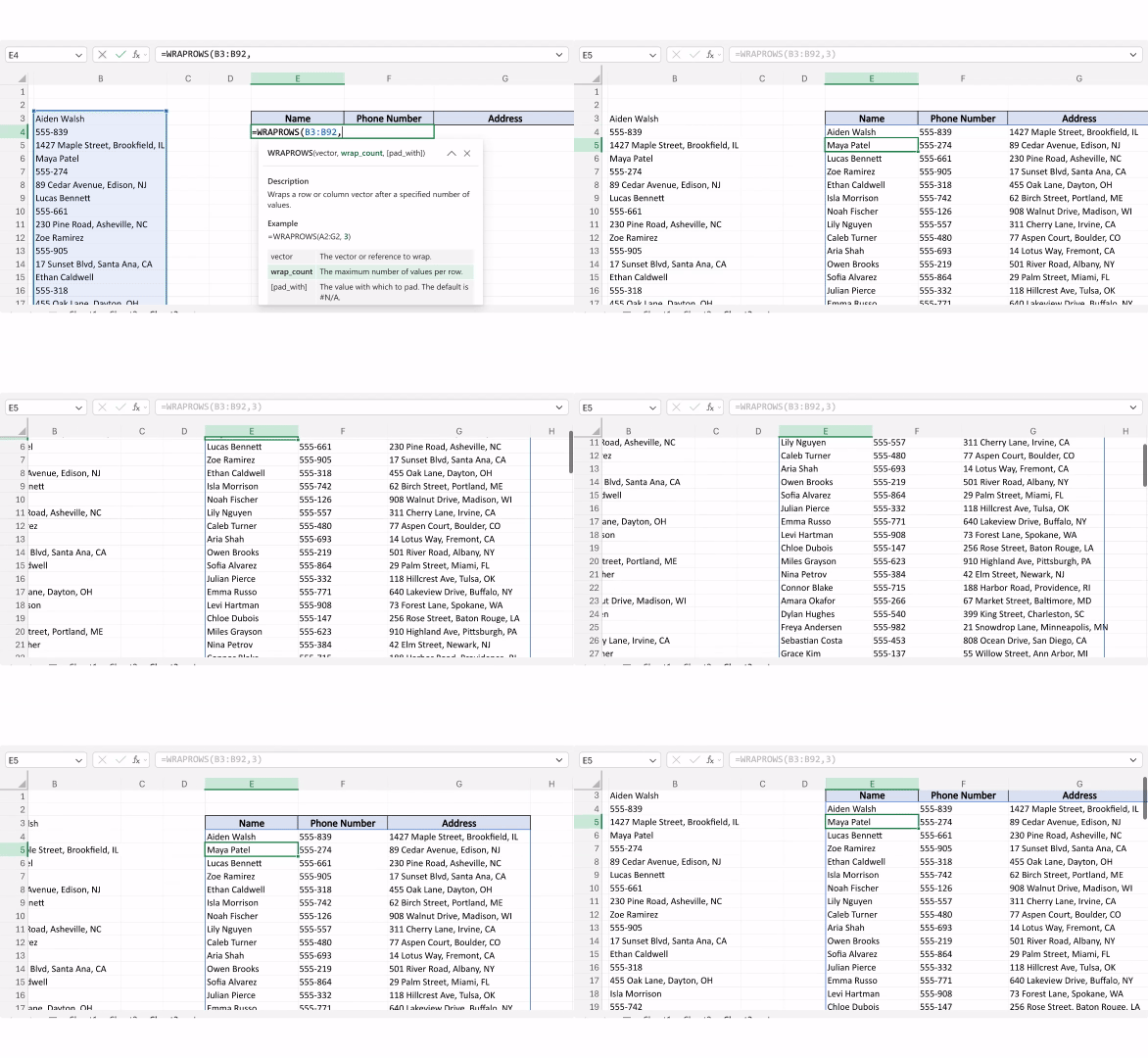
Fun fact: WRAPROWS has a sister function called TOCOL and TOROW, which do the opposite—they collapse a table back into a single column or row.
Whatever direction your data needs to go, Excel’s got you covered. 😎

How to Send an Unignorable Cold Email 📧
Every day, I get dozens of cold emails from all kinds of people. In a perfect world, I’d make a matcha and spend the day dutifully responding to each and every one. Unfortunately, hours are finite and I am only one person. 😅
But the cold emails that do get a reply? They all share a few things in common. Fellow content creator Hannah Zhang made a stellar video explaining exactly what makes some cold outreach completely unignorable.
Here’s the rundown →
Get clear on the “why”
Before you press send, ask yourself: What am I trying to do? Get advice? Land a job? Sell something? While “I’d love to connect!” is genuine, it doesn’t give us much to work with.
Find something you have in common
Do a little digging on the person you’re reaching out to. Do you have a mutual friend? Did you go to the same college? Are you from the same town? We’re more likely to respond to people we share something in common with.
Be short and specific
Be concise! Introduce yourself, make the connection, and finish with the ask. The person you’re reaching out to is probably juggling a million things. A wall of text feels like another “to-do” on their list. 😅
Don’t make them do additional work
“Let me know what time works for you!” feels accommodating, but now they have to dig through their calendar, cross-reference yours, and come up with a time. Instead, offer a calendar link or a window in their timezone. For example: “I’m free Fridays 3–5 PM ET.”
Don’t be afraid to follow up
If you don’t hear back after a few business days, send a follow-up—something like: “If a call doesn’t work, happy to send an email with further questions.” People want to help, but things fall through the cracks!
And remember: There’s no losing when it comes to sending that message. Worst case? They don’t answer. Best case? You make a connection that could change everything. ✨

Keep hitting your usage limit in Claude? Here are five easy fixes.
35,000 people now know how to clean their data in 30 seconds. 👀
I can’t believe more people don’t know about these two functions. 🤯
A messy spreadsheet doesn’t stand a chance against this shortcut.
“Shut up! This is so cool,” says a comment under my latest Excel trick!

Thanks for reading! I just got back from visiting family in Connecticut, where they have a farm of mini-cows. Turns out, people have been hiring my cousin to bring them to weddings, which is maybe the best job I’ve ever heard of. Guess you could call them my cowsins. 🤣 🐄
Stay Exceling,
Kat