- The Workbook
- Posts
- Turn a 15-minute task into 15 seconds 🏃
Turn a 15-minute task into 15 seconds 🏃
TEXT formula 🤝 calendar dates

Happy 2026! 🎊 I started this year with a fun experiment: I hired a professional organizer to get my closet as neat and tidy as my spreadsheets. 😂
But if your version of optimization looks a little more digital in 2026? We just extended our New Year’s sale exclusively for email subscribers!
Use code NEWME26 at checkout for 50% off all courses, and you'll get three free bonus items:
Career Advancement Toolkit: Includes a Promotion Power Plays Mini Course and a Resume Builder Tool to help you get promoted faster
Excel Glow-Up Kit: Organization Hacks Mini Course and Excel Templates to stay organized and look smarter
AI Productivity Playbooks: Two in-depth eBooks (Workplace Essential Prompts + Job Makeover with ChatGPT) to save hours at work
Here's to a more confident, productive you in 2026. ✨


Tech Tip Headline
Turn a 15-Minute Task into a 15-Second One 🏃
POV: You’re building a project timeline for January, and your boss wants to see which day of the week each date falls on. January 4, 2026, was a Sunday, so you can simply go down the list.
Monday. Tuesday. Wednesday. Thursday. Friday. Saturday…
…by day 15, your eyes hurt and you're questioning how much longer your Y key can take this. 🫠
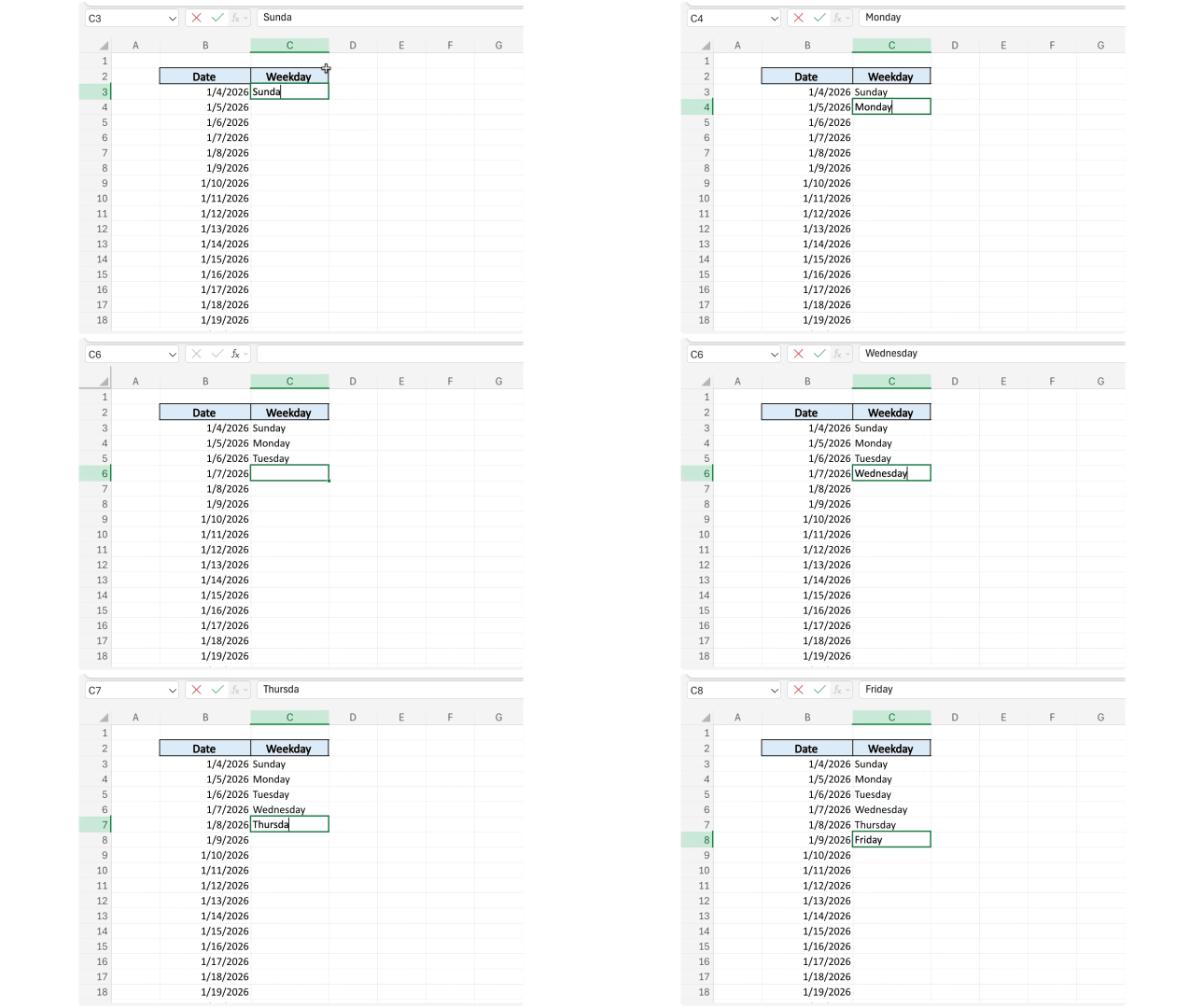
Let me save you from this situation:
Step 1) Click the cell where you want the day to appear.
Step 2) Type this formula: =TEXT(B3, “dddd”)
(Swap B3 for wherever your date lives!)
Step 3) Press Enter. Excel shows you the day instantly.
Step 4) Grab the fill handle (that little square in the bottom-right corner of the cell) and drag it down.
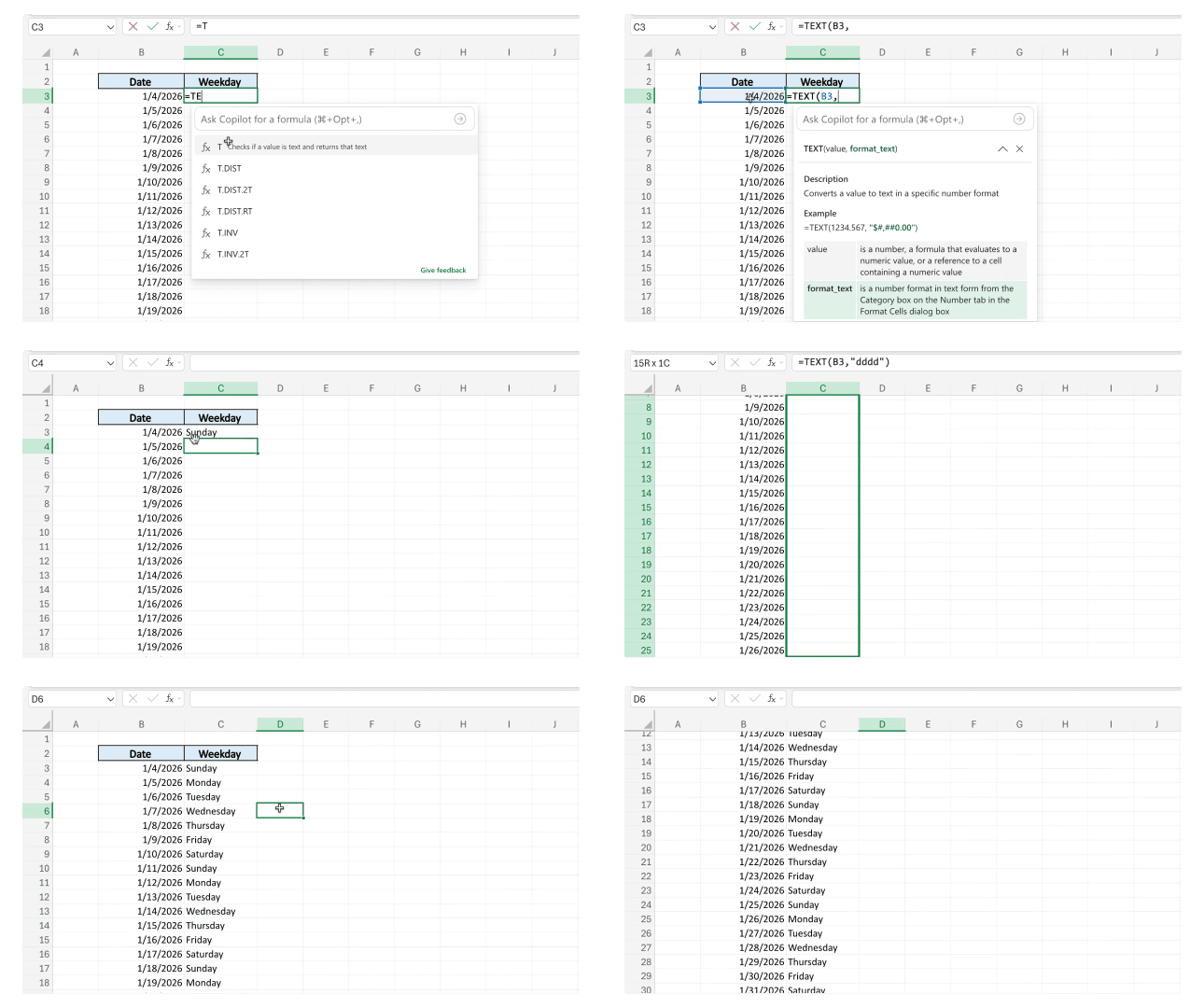
Done!
🎁 Bonus Tip: Want "Mon" instead of "Monday?" Use =TEXT(B3, “ddd”) for the abbreviated version.

New Year, New Skills (But Only If You Act Fast!) ⚡️
AI evolved fast in 2025—and so did we! Here's what you need to know:
Due to recent, exciting updates, our AI Course is increasing by $100 next month. This is your last opportunity to lock in the lowest price it will ever be.
We’ve also just launched two brand-new AI courses:
Advanced AI
Microsoft 365 Copilot
And if you grab the Smart Suite Bundle today, you’ll get both new courses at NO extra cost. Next month, this bundle price jumps by $300.
AI moved fast in 2025, and 2026 won't be any slower. Get ahead while you still can! Use code NEWME26 at checkout to get 50% off and lock in these prices before they’re gone.

The 2026 Rejection Challenge 🙇
For most of us, rejection feels like a door slamming in our face (and something we’ll replay in our heads at 2 AM for six months while cringing into our pillows 🙃).
But what if you needed to collect 1,000 rejections in 365 days?
That’s what content creator Gabriella Carr set out to do last year. She had dreams of acting, becoming a dual citizen, and making content, but she realized those goals were behind doors she’d been too afraid to knock on.
So instead of avoiding rejection, Gabriella decided to make it the point:
She set a goal to collect 1,000 nos.
And kept a notebook to track every single one.
And within a few months?
Gabriella got her Dutch passport, became a pageant title holder, performed in 11 shows, was an extra in a TV commercial, and collaborated with brands like L’Oréal. All from chasing the word “no.”
Why I’m such a fan of this: I’m a big believer in energy. Both in a woo-woo way and in a practical sense—to get what you want, you have to first place your energy into asking for it.
But? Most of us walk away without ever knocking on the right door because we’re too afraid of rejection. The problem is that a door can’t open if no one knocks!
Fear tends to fade once you expect rejection. After you start embracing it, asking feels a whole lot easier. Most importantly? It only really takes one rogue “yes” to get you into a room you only ever dreamed of being in.

1,000 people liked this video on how to track attendance in Excel. 🏫
This Excel feature pulls data from pictures like actual magic. 🪄
The five-second trick that wraps text so you never have to. ✋
Declutter your Outlook inbox in 10 seconds with snooze. 💤
Don’t watch this video unless you want to get better at Excel in 2026. 👀

Thanks for being here! Recently, someone asked if I had any career tips. My honest answer? Don’t underestimate what upgrading small skills can do for your career. 💼
Learning one new Excel function can turn a two-hour task into a five-minute one, put you on the fast track for a promotion, and free up hours of your time so you can focus on high-level tasks.
Speaking of, our New Year sale is still running for email subscribers, but it ends soon! If you've been waiting for the right time to invest in your skills, this is it.
Use code NEWME26 at checkout to take 50% off (plus get three bonus items! 🎁).
Stay Exceling,
Kat