- The Workbook
- Posts
- This formula will save you...
This formula will save you...
...from asking an awkward question 🫠

Hey! Hope you’re surviving Holiday Party Marathon Season. 🌲 Last week was my HOA’s holiday party, complete with a red and green dress code (which gave me the perfect excuse to whip out my green jumpsuit 😂).
Speaking of parties, come join my free new Excel class where I share my best Excel tips of 2025! After this 1-hour class, you will know the highest-impact Excel tips that have helped millions of people save 3+ hours every single week.
Quick heads up: I won’t be in your inbox next week to unplug and recharge. Hope you get to do the same! May your holidays be error-free and your Pivot Tables be merry.🎄


The (Not Awkward) Way to Calculate Ages in Excel 🎂
Imagine your boss asks you to find out everyone’s age for a new benefits enrollment plan. Here are your options:
Ask your co-workers directly (no thank you!)
Piece it together from your Facebook profiles like some kind of birthday detective 🕵️
Get their birthdates from HR and spend two hours doing the math yourself
Plot twist: You don’t have to do any of those! Try this instead:
Step 1) Make sure you have your birthdates in a column
Step 2) Type =DATEDIF(C3,TODAY(),”Y”)
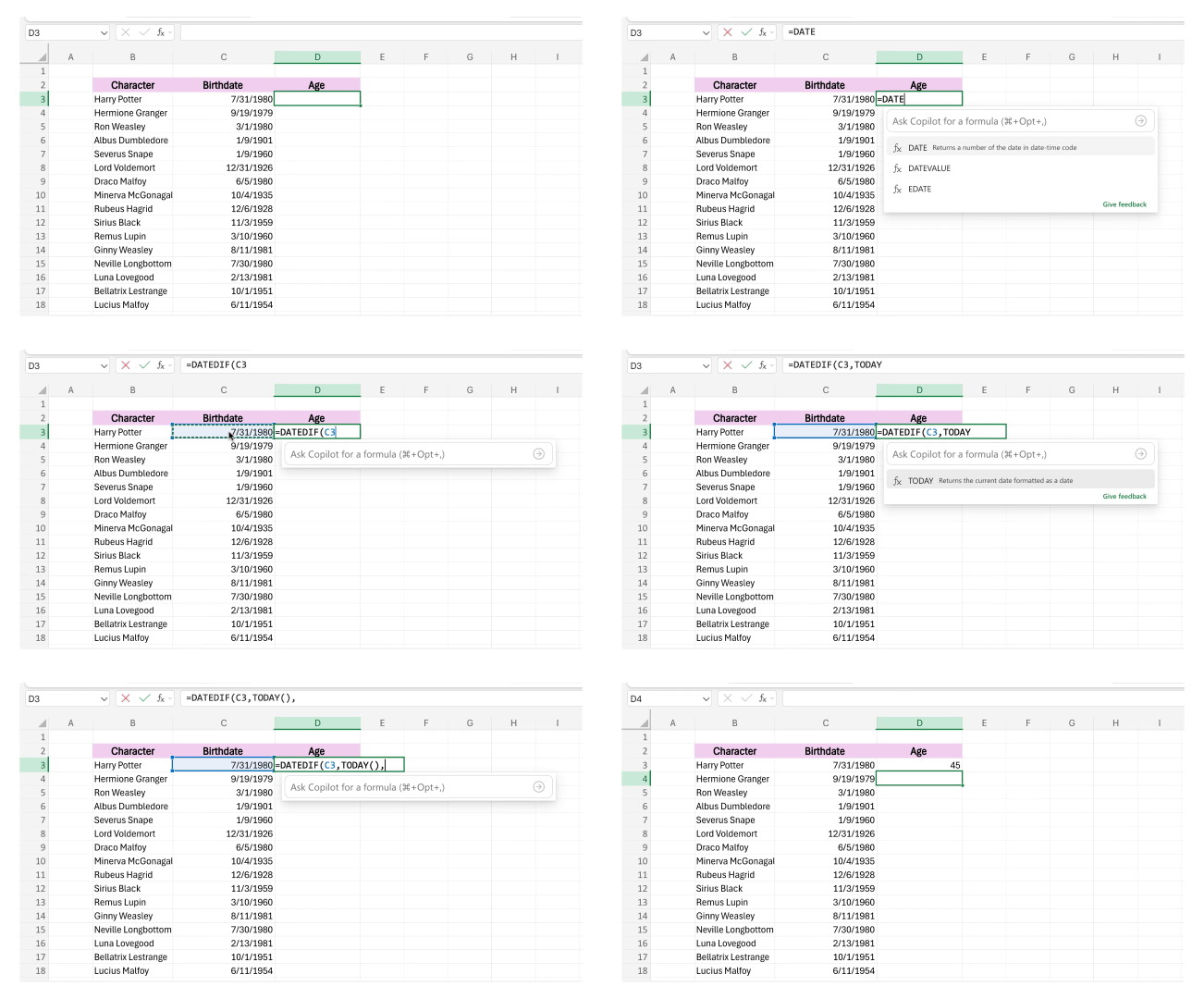
Step 3) Hit Enter. Drag and Excel autofills the rest!

Bonus Tip: The “Y” in the formula tells Excel to calculate in years, but you can also use “M” for months or “D” for days.
This formula is a great go-to whether you’re handling benefit enrollment, planning milestone celebrations, or segmenting customers by age group for marketing campaigns. Or even…trying to remember which family member is turning which age when. 😅
P.S. I tried to calculate Dumbledore's birthday (sometime in 1881), but Excel can only handle birthdates from 1900 onward. Guess Excel wasn’t built for immortal wizards. 🧙

How to Level-Up During the Holidays ✨
I’ve been chatting with a lot of people who are a little worried about 2026.
They have no idea how work will change. With AI growing, they’re asking themselves: How will my skills keep up? What should I expect next year?
If that’s you, the holidays can be a perfect time to do something about it. Not because you have to panic, but because starting January prepared beats starting it feeling left behind.
That’s why I’m hosting a free new Excel class where I’ll show you how to save 3+ hours a week with my top 2025 Excel tips! In just one hour, you’ll walk away feeling more confident about Excel and how to handle what’s coming ahead next year.
Thousands of people have already taken this class. Here’s what they had to say:

Here’s to taking 2026 head-on and making it the best year yet. 💚

You Got What You Wanted. Now What? 💭
Recently, I’ve been sitting on this question: “What would you do if you got what you wanted?” Not in a vague “I’d be happy” way. I mean specifically—how would you spend your days? What would change?
Most people know what they want. Maybe it’s a six-figure salary, a VP title, a remote job, or more free time. Love that! But let’s say you actually get it. Now what?
Here’s what I mean:
The six-figure salary: What are you spending it on? Are you saving it? Traveling more? Moving? Without the vision, the money is just a number in your bank account.
A VP title: Would you lead a bigger team? Launch a new project? Create a new department? If you’re unsure, you might do the same work (with a fancier title).
Free time: What would you fill it with? A hobby? Time with family? Learning a new skill? No clear plans means those extra hours could disappear to chores or scrolling.
As content creator and entrepreneur Gabby Beckford puts it, you can have all the tools—the brush, paint, and canvas—but without the vision, you can’t create your masterpiece.
Since we’re about to ring in 2026 (just 14 days left! 💫), I’ve been seeing a lot of goal-setting and resolution posts. But before you write “earn more money” or “get promoted,” get clear on what you’d do with it.
Goals are just tools to help us create the life we want. But we can’t create that life if we don’t know what it looks like. 💚

If you’re fixing Excel columns by hand, you’ll love this 15-second tip.
Turn your PowerPoint from “meh” to “wow” with animations. 🏃
“Such a creative idea!” reads a comment on my Excel picture chart hack. 🎄
I guarantee this dynamic scoreboard in Excel will blow your boss away. 🤯
LinkedIn’s CEO shares the most common career advice he thinks is outdated. 😯

Thanks for reading! We’re about to close out the year with over 400,000 of you subscribed to The Workbook!
That’s about the population size of Tampa, Florida 😮 (I can’t think about it too much or else I’ll get stage fright writing these newsletters 😂). Thank you for being here!
Have an Excel-ent holiday,
Kat