- The Workbook
- Posts
- The tiny formula that prevents big mistakes 😯
The tiny formula that prevents big mistakes 😯
Don’t sleep on EDATE!

Hi there! Exciting news: We’re hiring part-time corporate trainers to join the Miss Excel team! 🤩 Here are the details:
The What: Deliver live virtual training sessions (60–90 minutes) on Excel, Google Sheets, PowerPoint, AI, and more to our corporate clients. We handle all the training material—your job is to present it to the organization!
The How: I’ll personally onboard you with the Miss Excel method—our proven approach to running engaging virtual events!
The Commitment: 5-10 hours per month and fully remote.
The Requirements: Expert level in either Microsoft Office, AI or Google and amazing virtual presentation skills!
If you’re someone who geeks out over all this Microsoft and AI, we’d LOVE to have you on the team. Apply below! 💚


The Tiny Formula That Prevents Big Mistakes
“I think I just made a really expensive mistake.”
I got that text from my friend last year. 🫠 Her company had just launched a two-month free trial and hundreds of potential customers had signed up. Her job was to track when trials expired so the sales team could follow up.
She told me she’d been manually adding two months to every customer’s start date. Long story short? She miscounted a handful of dates and accidentally gave dozens of customers extended trials. 🙃

That’s when I introduced her to EDATE! Here’s how it works:
Step 1) Click on your first empty End Date cell (D2)
Step 2) Type =EDATE(C3,2)
C3 = your start date
2 = number of months to add
Step 3) Hit Enter and double-click
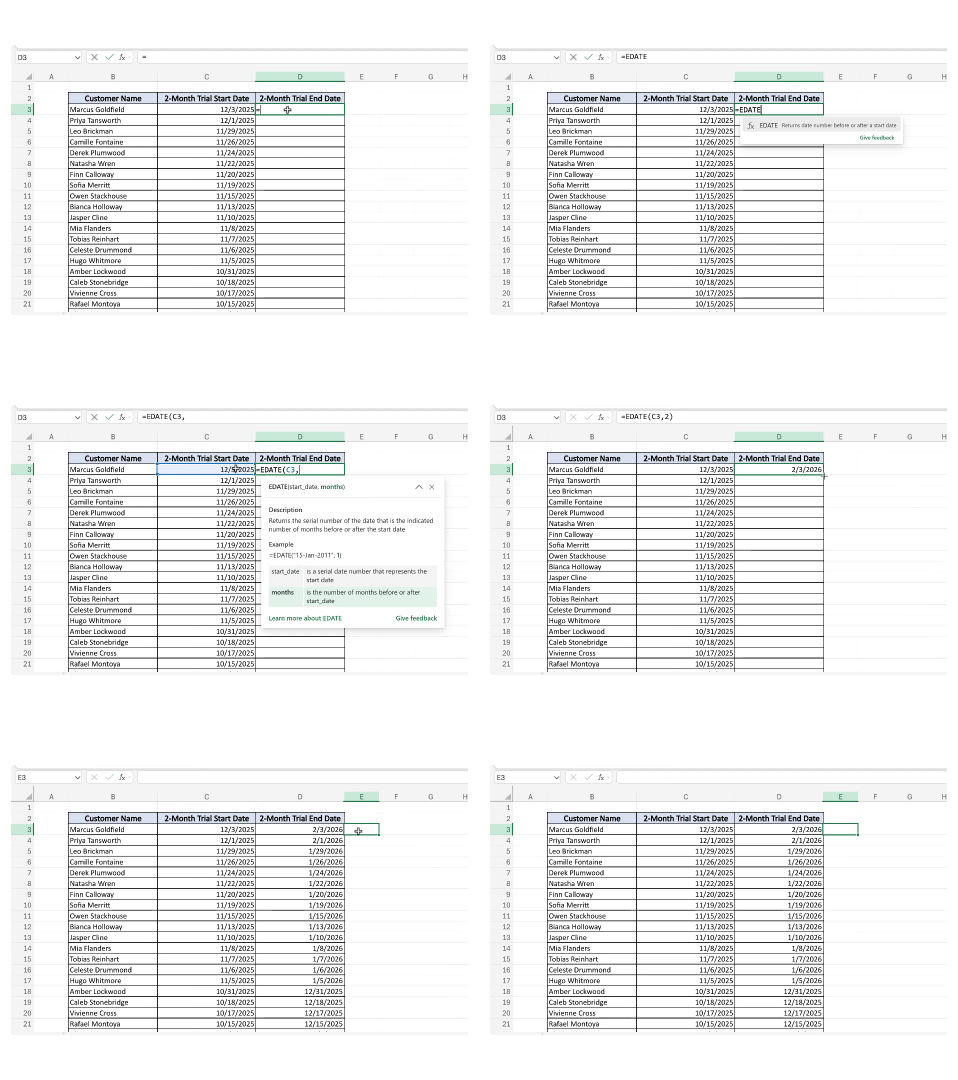
All set! No more miscalculated dates here. 🤝

Advanced AI With Miss Excel Is Officially Live! 🥳
It’s been months of building. Now the wait is finally over! Advanced AI With Miss Excel is officially live (if you pre-ordered, head to your dashboard to dive in!).
This isn’t your basic intro AI class. You'll go beyond basic prompting and learn how to design workflows, build custom agents, prevent hallucinations, and engineer reliable AI systems inside tools like ChatGPT, Microsoft Copilot, and Google Gemini.
AI courses that are easy to understand and actually advance your career is what we do best (as one student will tell you!) ➡️

Ready to save hours at work and impress your boss with improved AI skills? Use the code ADVANCED20 for 20% off!

Don’t Waste Your Messy Minutes ⏱️
What if the thing standing between you and your goals isn't time, but your idea of what that time needs to look like?
Hear me out: We all have this ✨ fantasy ✨ of the perfectly productive day. A wide open morning with zero calls, zero interruptions, nothing but you and your caffeinated beverage of choice. ☕
And if you can regularly make that happen? That’s amazing and I’m not at all jealous. 😅 But for most of us, carving out hours of uninterrupted time means either losing sleep or weekends (or both). The good news is that you can make progress with the time you already have. 👀
I call them Messy Minutes. They’re the four minutes before your next client call, the 12 minutes waiting for your lunch, the eight minutes while your coffee brews. These little gaps feel “too small” to get anything done, but they compound fast:
One sentence a day is a first draft by the weekend.
Two pages of reading a day is 60 pages in a month.
Three minutes of meditation a day is over 18 hours of stillness in a year.
The idea that you need long stretches of uninterrupted time to make progress is one of the biggest myths of productivity. Sure, we’d all have that luxury in a perfect world, but real life is fragmented and hectic. That’s what your Messy Minutes are for.
They're small, they're awkward, and they are so full of potential. Use them! ✨

What do all successful people have in common? They speak the same hidden language. Now Erin McGoff is letting you in on it in her new book, The Secret Language of Work. 📚
The Excel chart that makes your data look 10x more polished. ✨
Inconsistent capitalization is an Excel red flag. Here's the fix. 🚩
I saw my coworker drawing charts. Then I showed her Python. 🪄
Nothing says "I know Excel" like a dark mode toggle button!

Thanks for reading! A last little piece of advice before we part ways: If you’ve been trying to hit inbox zero but just can't get there, try turning off the red badge app notification instead. It’s such an easy way to reclaim your peace of mind. 💚
Here's how on iOS: Settings > Notifications > Mail > Badge App Icon > Toggle Off
Stay Exceling,
Kat