- The Workbook
- Posts
- The Excel option nobody considers 🤯
The Excel option nobody considers 🤯
How to find formulas in seconds!

Hi there! You know AI could save you hours and automate your busywork. But your to-do list is already a mile long and learning the ropes of AI feels intimidating.
So your mind does the thing. You know the thing.
It convinces you that you'll start “tomorrow.” But you started telling yourself that *checks notes* six months ago now. 😅 Let’s turn tomorrow into today, shall we?
Join my live (brand new!) free AI class and finally get ahead of AI! In just one hour, you’ll learn how to turn AI into a teammate that clears your plate and saves you 3+ hours each week.
P.S. Can’t make any of the times work? No worries! Register for any session anyway and I’ll send you the replay!


Let Claude Do the Heavy Lifting 🤖
It seemed simple enough: Extract the numbers out of Column C.
“Perfect. I’ll just Google a formula real quick,” you thought. But 49 minutes, 32 browser tabs, and four broken formulas later, you’ve made no progress.
At this point, you might as well have typed the numbers by hand. 🫠
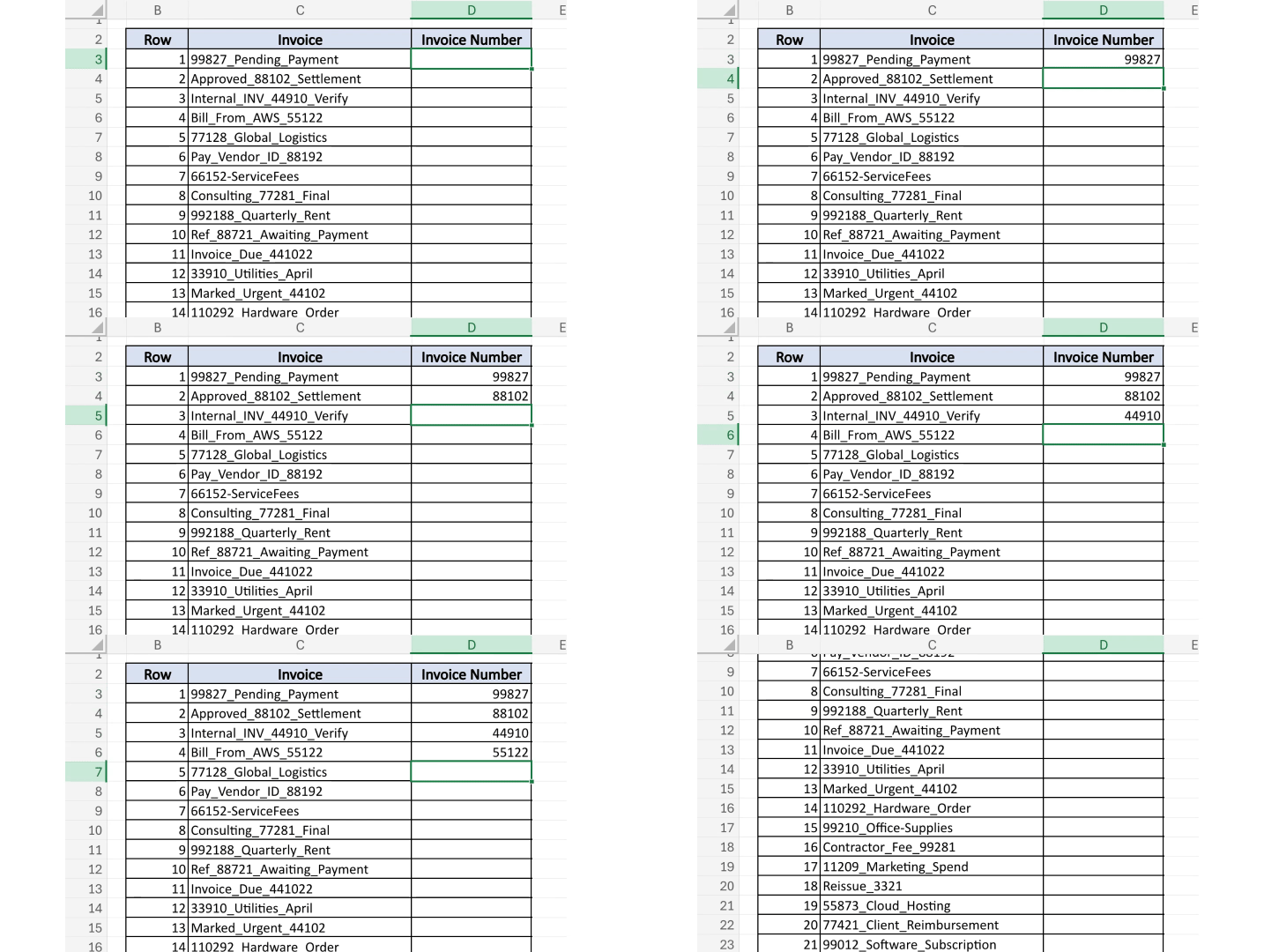
But before you do that, consider this option: 👀 Claude! Everyone knows Claude is great for drafting emails and answering questions, but it moonlights as a pretty incredible Excel wizard, too.
All you have to do is open Claude and type: “Give me an Excel formula that will extract the number from Column C under invoice.” Then:
Step 1) Copy the formula Claude gives you

Step 2) Paste it into your desired cell in Excel
Step 3) Double-click to fill it down the column

And just like that, Column C goes from a chaotic mess to a clean list of numbers (and your 32 browser tabs can rest in peace 🪦).
This tip is just scratching the surface of what Claude can do. There’s so much more—and my brand new (free!) live AI class walks you through all of it so you can start saving up to 3+ hours per week. Don’t forget to register before seats are gone!

Exciting news! We’re hiring a remote, full-time Social Media and Marketing Manager to join our fun and fast-paced team and help us grow both the Miss Excel and Kat Norton brands to the next level! Here are the details: 👇️
Responsibilities:
Content Creation: Collaborate with our team to help ideate, script, create, and post content across both brands. I do the filming and our editing team handles the heavy lifting on most edits, but you'll need to be strong in Canva, CapCut, and Instagram's in-app editing tools for any quick-turn/simple content.
Community: Manage DMs, comments, and our Facebook group.
Launches & Webinars: Support our webinar events and promotions end to end (we will teach you everything!).
Systems & Automations: Build out GoHighLevel (GHL) landing pages and update our ManyChat funnels.
Partnerships & Affiliates: Manage our affiliate program, brand partnerships, and review the newsletter.
What We’re Looking For:
✅ 3+ years successfully running social media pages with proof you’ve grown accounts
✅ A self-starter who works fast, communicates clearly, and cares about the details
✅ Someone genuinely excited about the Miss Excel world and creator-driven content
✅ Fluent in AI tools and excited to help us continue to automate our marketing processes
✅ Must be eligible to work in the US
✅ Good vibes 🙂
More Details:
👉️ $75k-85k base salary with up to $50k in performance bonuses
👉️ Fully remote

If you’re excited about the Miss Excel brand and obsessed with all things social media, we’d love to hear from you! Click the link below to apply. 💚

How to Post on LinkedIn Without Cringing at Yourself 🫣
Most people have a…complicated relationship with LinkedIn. We open the app, see six “I’m thrilled to announce” posts in a row, and bounce.
And that’s just the LinkedIn scrolling experience. Posting there can feel even cringier, especially when you know your co-workers and high school classmates are watching.
But with 1.3 billion users, LinkedIn is still one of the best places to land jobs, future clients, and career-altering connections. Here are three tips on how to post on LinkedIn (without wanting to delete your account afterward 😅).
Learning > expert
Instead of waiting until you’re an “expert,” share what you’re learning now! A post like “Here’s what I realized after I made this mistake” or “How I’ve been using AI as a newbie” positions you as someone curious and growth-minded (two traits recruiters love to see 👀).
Add your take
Find news making waves in your industry and share your two cents. Use the “yes, and” approach to agree and build on it, or “no, but” to bush pack and explain your thinking.
Comments count more than you think
Not brave enough to post yet? No problem!
Leave thoughtful comments under other people’s posts. Not only is it a miniature post, but if you’re commenting under someone you’d love to work with one day, they may already recognize your name when you reach out.
Remember: The cringiest part is right before you share. Then it’s over! For a platform that could introduce you to your next dream job or client, that’s a pretty worthy trade-off if you ask me. 😊

The Excel trick that separates the pros from the beginners. 🤝
How to color-code your Excel data without touching a single formula.
Don’t learn this XLOOKUP trick (unless you want to leave work early).
Boss: “This spreadsheet is a nightmare. 😩” You: “Give me 30 seconds.”
Have you been merging cells the hard way? Let’s find out. 👀

Thanks for reading! For those of you who’ve registered for my live (brand new!) free AI class: Can’t wait to see you! And if you haven’t registered yet, here’s what’s waiting for you on the other side:
Becoming the person who gets promoted because of their AI fluency (and not replaced by it!)
3+ hours saved every week from automating busywork that drains you
AI that works for you—instead of overwhelming you 😵💫
There are only two classes left. After that? They’re gone. Be sure to register so you don’t miss it!
Stay Exceling,
Kat