- The Workbook
- Posts
- Are you running or LEADING your meetings 🤔
Are you running or LEADING your meetings 🤔
Plus: The dog-inspired spreadsheet hack!

Hey there! Last week, a bunch of you reached out buzzing about our new AI courses. Your excitement was SO contagious that I decided to do something a little wild.
(Don’t tell my team about this! 🤫 Seriously, they have no idea.)
For newsletter subscribers only, I’ve created a secret 50% off code that is only avalable through tomorrow. Use code LASTSHOT at checkout to get half off the Smart Suite Bundle, the AI Bundle, or any of our AI Courses.
Here’s what’s changing after tomorrow:
Our AI Course price is going up by $100
The Smart Suite Bundle (now including our two newest courses: Advanced AI and Copilot!) is going up by $300
This means if you grab the Smart Suite Bundle right now, you’re saving $300 before the price jumps. Both new AI courses are included at today’s price, but after midnight tomorrow? This deal is gone forever, and prices go up permanently.
Today is the final day to lock in an investment that'll pay off every single week for the rest of your career. 💚 Don’t miss your window!


The Dog-Inspired Spreadsheet Hack 🐕
A friend of mine volunteered at an animal shelter and had this spreadsheet of dog names. Her job? To manually highlight every “Poor” rating—in friendliness, obedience, grooming needs, you name it. Basically, she was hunting for problem areas in a sea of good boys and girls.
I watched her do this for five minutes before my eyes started twitching:
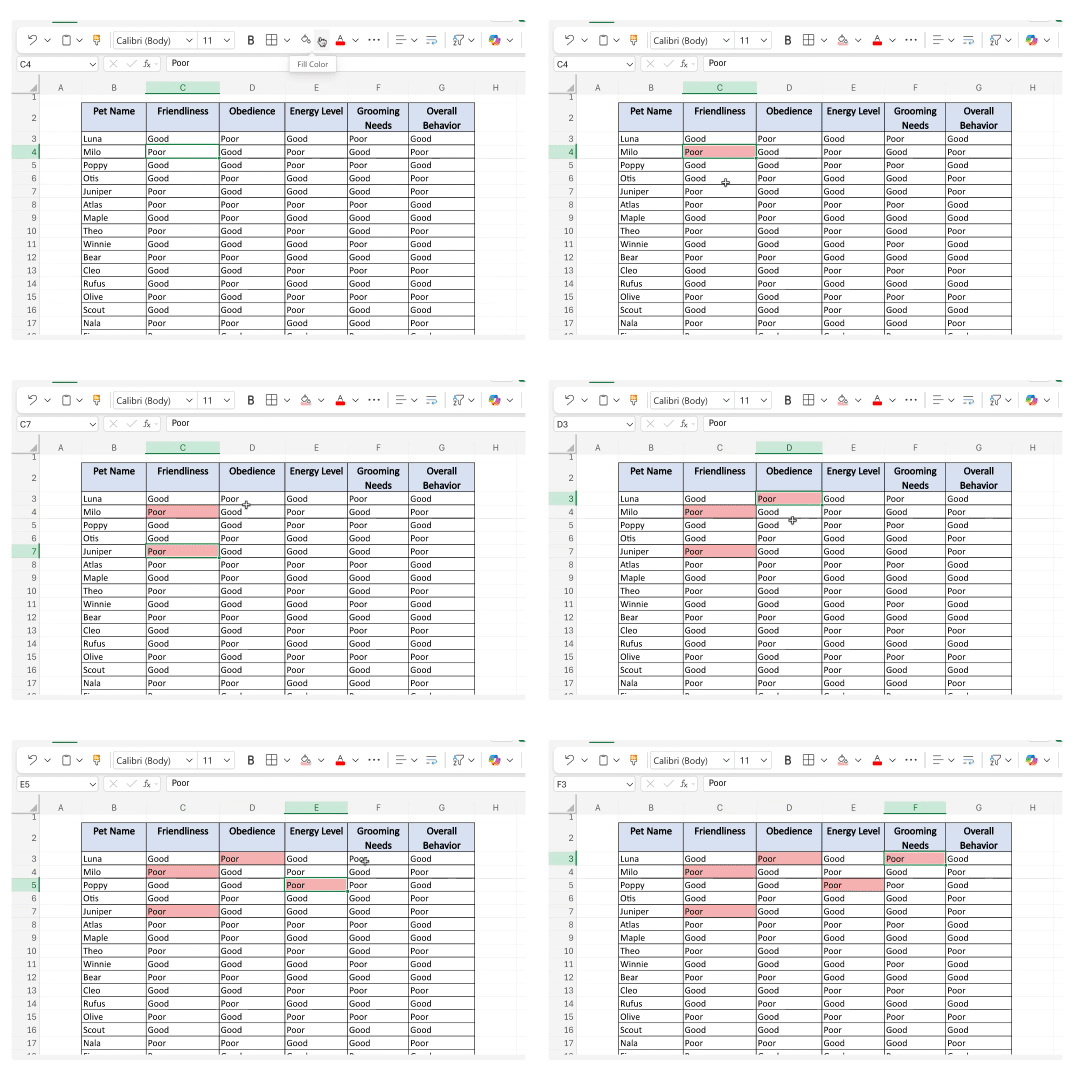
Here’s what I showed her instead:
Step 1) Select all your data
Step 2) Go to Home > Conditional Formatting > Highlight Cell Rules > Equal To

Step 3) Type in what you want to highlight and select your Format Style
Step 4) Press Done. Voila!

This tip isn’t just for rating shelter dogs. Use Conditional Formatting to:
Flag "Overdue" invoices in your payment tracker
Highlight "High Priority" tasks in your project list
Spot "Pending" approvals that need follow-up
Find "Out of Stock" inventory items
In short: Any time you're scanning for specific text in a sea of data, this feature is your best friend.
P.S. If you're on Windows, watch my video so you know what to look for. The menus can look slightly different!

Ever Feel Like Tools at Work are Evolving WAY Too Fast?
You’re definitely not alone! I can’t tell you how many people have told me they tried to learn Excel or AI…but got overwhelmed and threw in the towel. 🥲
That’s why we designed the Smart Suite Bundle the way we did. Every lesson is bite-sized and breaks down complex topics into clear steps that you can actually understand. Don’t just take it from me—here’s what some of our previous students had to say!

The Smart Suite now includes two brand-new AI courses (Advanced AI and Microsoft 365 Copilot) and has hours of valuable content inside.
Tomorrow… the price is going up by $300.
I hope you take advantage before the sale is over! The Smart Suite Bundle is the clearest, most beginner-friendly way to finally get a handle on AI, and today is your last chance to get it at the lowest price it’ll ever be. 💚

The Difference Between Running and Leading a Meeting 🙇
Ever run a meeting and feel people…checking out? You glance up from your presentation, and you’re met with glazed eyes, fake note taking, and someone on mute who is 100% eating chips. 🙃
Chances are, your meeting started something like this:
“Hey, everybody. I’m going to, um, share my screen. This is a spreadsheet of our campaign. Column B is views, Column C is sales. Some campaigns did well, um, some didn't. Let’s scroll down…”
What went wrong? This is a classic case of presenting information instead of leading a conversation:
Presenting is walking people through data.
Leading a conversation is giving people a reason to care about that data and inviting them to engage with it.
If you've ever felt like your meetings fall flat (even though you're prepared!), this might be your culprit. The good news? Career coach Kendall Berg has a simple three-part framework that fixes this: Context, Problem, Audience. Here’s an example of it in action:
Context: “Thanks for hopping on! I’d love to give some context before we get started. We ran six campaigns in Q1. While some performed well, they were anomalies. Today, we’re figuring out what worked so we can do more of it going forward.”
Problem: “The problem we want to solve is that we’re not getting the same retention from each campaign.”
Audience: “We need to fix this for our core customers: working parents 18–35 who are juggling a million things.”
Anyone can pull up a spreadsheet and point at numbers. But what really sets you apart is when you know what those numbers mean and how to get people to care.
Once you master that, your meetings go from zoned out to locked in. 💪

Did you know you could turn the 👍 and 👎 emojis into an Excel chart?
Don’t watch this Excel tip unless you want to leave the office early. 🏃
This tip has helped me get out of my own way hundreds of times.
If messy Excel data is giving you a headache, here’s your Tylenol. 💊
843 people now know this Excel picture chart hack. Are you next? 👀

Thanks for being here! Remember that 50% off sale I’m not supposed to be offering? 😶
It’s really ending. Use code LASTSHOT at checkout to save 50% on the Smart Suite Bundle, AI Bundle, or any of our AI Courses (AI with Miss Excel, Advanced AI with Miss Excel, or Copilot with Miss Excel) before prices go up permanently.
Get it now before it’s gone!
Stay Exceling,
Kat